Savings & Deposits
Loans
Digital Banking
Other Services
Oriental Mobile Banking
ORIENTAL MOBILE

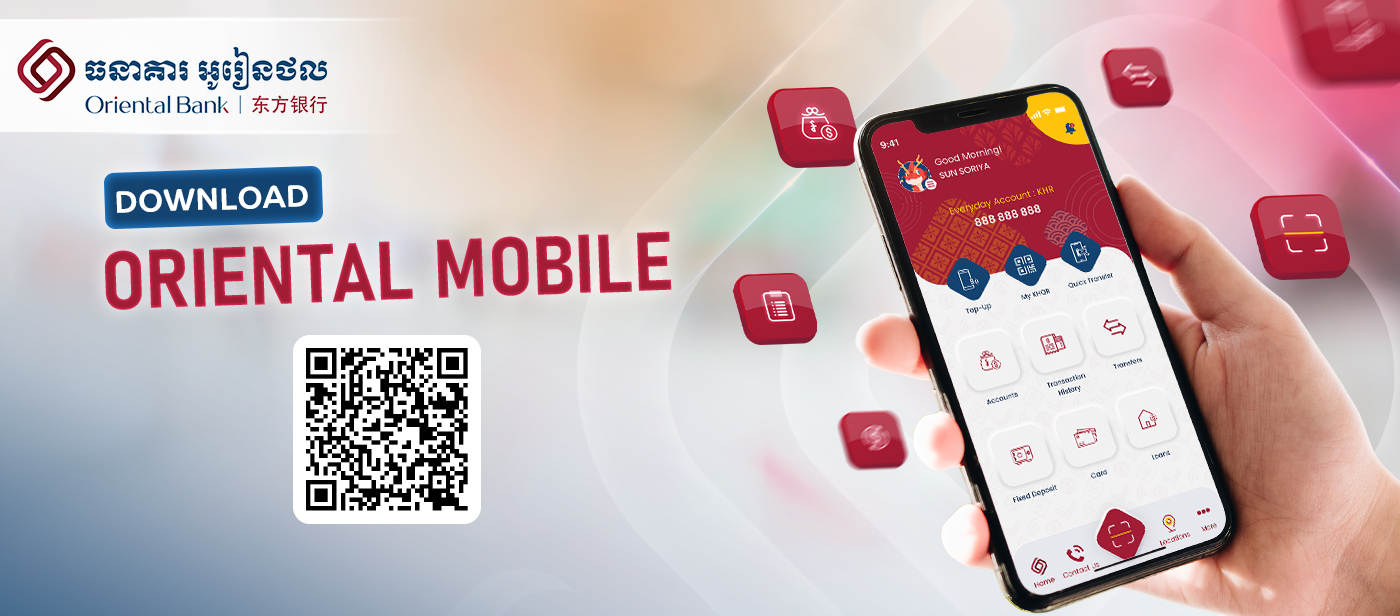
The Oriental Mobile, designed with the most innovative technology, is user-friendly, and more secure with fewer clicks. 

Oriental, Banking Beyond Boundaries!
FEATURES & BENEFITS

ACCOUNT MANAGEMENT

ACCOUNT MANAGEMENT

Allows users to manage their bank accounts, including viewing account balances and accessing transaction history. 
MOBILE TOP UP

MOBILE TOP UP

Enables users to perform instant mobile phone top-up service from anywhere, at any time.
FUND TRANSFER

FUND TRANSFER

Facilitates fund transfers between own accounts to other accounts within the same bank, and accounts at other banks.

STANDARD KHQR

STANDARD KHQR

Enables users to generate static and dynamic QR codes to receive payments, as well as scan other QR codes to make payments, same bank or inter-banks.

ACCOUNT LIMIT

ACCOUNT LIMIT

Enable users to set their preferred daily transaction limit.
FIXED DEPOSIT

FIXED DEPOSIT

Enables users to place/withdraw fixed deposits in KHR or USD currency through the mobile banking app without having to go to the bank.
APPROVAL WORKFLOW

APPROVAL WORKFLOW

Allows users to monitor and approve financial transactions of their Joint Account anytime and anywhere.

OPEN EXPRESS ACCOUNT

OPEN EXPRESS ACCOUNT

Enables users to open an Express Account (eKYC) without having to visit the bank, and then easily upgrade to full-service account by completing the KYC at the bank counter subsequently at their convenience.
Cross-Border Money Transfer

Cross-Border Money Transfer

Experience seamless cross-border money transfers directly from the Oriental Mobile App. With the International Transfer feature, customers can securely send funds overseas anytime, anywhere through a fast, convenient, and user-friendly digital banking experience.

HOW TO ACTIVATE ORIENTAL MOBILE


FAQS OF ORIENTAL MOBILE

Oriental Mobile is Oriental Bank’s proprietary mobile banking application, accessible via smartphones. It allows customers to perform banking transactions anytime and anywhere.

Oriental Mobile offers advanced and unique features:

  • Less clicks
  • Enhanced security
  • User-friendly interface
  • Modern and innovative design
  • Uniquely designed for Joint Account operations 

To open Oriental Mobile's Express Account, you need to follow the following requirements:

  • Individuals aged 18 years or older who have never had an account with Oriental Bank.
  • Have a mobile phone with an operating system such as iOS, Android, or HarmonyOS.
  • Have an active mobile phone number and a valid National ID.

  • Download Oriental Mobile on Playstore, Appstore or AppGallery.
  • Choose your preferred language 
  • Select “Sign Up” 
  • Enter your CIF number 
  • Create and confirm your login password 
  • Enter the One-Time Password (OTP) sent to your mobile phone 
  • Create and confirm your 4-digit transaction PIN 
  • Agree to the “Terms and Conditions” on Oriental Mobile 
  • Choose to enable biometrics or click “Cancel” to not do it 
  • You have now successfully signed up for the Oriental Mobile app! 

Yes, you can use Oriental Mobile everywhere you go as long as you have an active internet connection.

Absolutely! Oriental Mobile is specifically designed to support Joint Accounts, especially the mode of operation of approval on transactions which is nearly identical to those conducted over the counter, providing greater safeguards and accountability in managing your accounts.

For assistance, please visit your nearest branch or contact our Customer Support Center at +855 23 932 288. 

The service is available for:

·         Individual account holder with full KYC verification

The service is currently not available for:

·         Minor accounts

Joint accounts (coming soon)

Transfer to Bank Account:

Person to Person only 

  • China (Mainland)  

Person to Person & Person to Business

  • USA 
  • UK 
  • Singapore 
  • Malaysia 
  • Hong Kong 
  • Vietnam

Transfer to Wallet:

  • China (Mainland) 
  • Alipay 
  • WeChat Pay

  1. Log in to Oriental Mobile

  2. Select “Transfer” > “International Transfer”

  3. Select “ Country/Region”

  4. Choose Transfer To (Account or Wallet)

  5. Input Transfer Amount

  6. Enter Beneficiary Details as shown on the screen

  7. Review Exchange Rate, Fees, and Details

  8. Agree on Terms & Condition and Confirm Transaction PIN

  9. Transaction is processed and confirmation is displayed

Flat transfer fee: USD 8 per transaction during the promotional period.

Transfers are processed almost instantly. However, the actual receiving time may vary depending on the receiving bank or wallet provider.


 Yes. Transactions are protected through Visa’s global payment network and the security measures available within Oriental Bank PLC

Cancellation depends on the transaction processing status:

  • Cancellation may be possible before the funds are received by the beneficiary
  • Additional fees may apply

Once the beneficiary receives the funds, cancellation is no longer possible

No. The entire process is fully digital and can be completed through the mobile banking app without visiting a branch.

Depending on the transfer type, you may need:

  • Beneficiary full name
  • Bank account number or wallet ID
  • Beneficiary bank details
  • Purpose of transfer

Yes. You will receive an in-app confirmation and transaction record once the transfer is successfully submitted.
ADDITIONAL FEATURES

BIOMETRIC AUTHENTICATION

BIOMETRIC AUTHENTICATION

Biometric data, such as fingerprints or facial recognition, provides an additional level of security as it is unique to each individual and difficult to replicate.

SECURE LOGIN CREDENTIALS

SECURE LOGIN CREDENTIALS

Enforce strong password policies, with complex passwords that include a combination of letters, numbers, and special characters. 
DATA ENCRYPTION

DATA ENCRYPTION

Ensures that sensitive information is securely transmitted and cannot be intercepted or deciphered by unauthorized parties.

BIOMETRIC AUTHENTICATION

BIOMETRIC AUTHENTICATION

  • Customers can include or exclude (show or hide) their Current Account, Savings Account and Fixed Deposit accounts from their Personal Mobile Banking platform.
  • Customers have the option to choose how to withdraw their Fixed Deposit either “Over the Counter” or “Over the Counter and Mobile /Internet Banking”. Selecting the “Over the Counter” option requires customers to conduct the transaction in person, which adds an extra layer of security to their accounts.